Changes Calculation
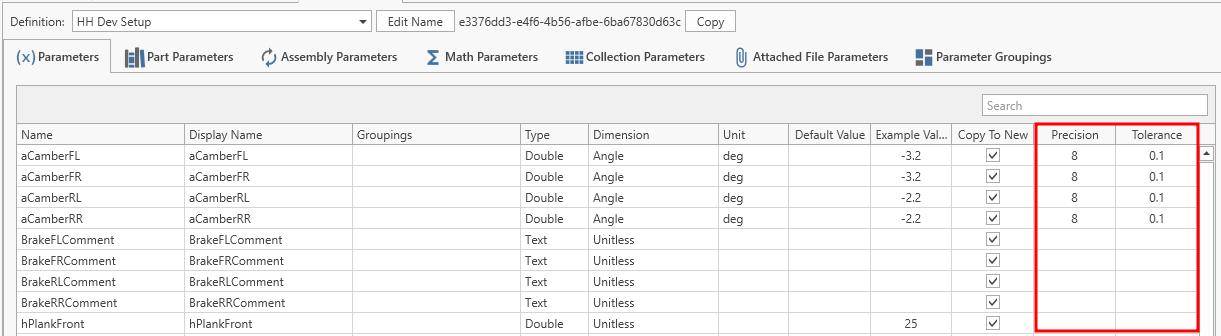
The changes calculation is used to compare two items of the same type and output the list of differences. In general it is a simple comparer that compares each parameter value between the two items. However, for numerical values, due to the imprecision of floating point calculations, the precision of each parameter can be defined individually. Furthermore the tolerance can be adjusted to control how large a change has to be to get counted. Both of these parameters are controlled in the definitions view.
The changes calculation is used in:
- the CID to highlight the differences between the items
- the runsheet to list the setup changes compared to the previous run
- the math expression
CalculateChanges
The first item is treated as the initial state and the second item as the current state. Each detected change is reported on its own line in the form:
Parameter Name: initial value to current value
Values that are not set are shown as <not set>.
Compared parameter types
Text, number, boolean, part and assembly parameters are compared. Date time, enum and integer parameters are not included in the list of changes. Number parameters are compared using the precision and change tracking tolerance defined on the definition, as described above.
Parameter labels
Each line is labelled with the display name of the parameter. If a parameter has no display name, its name is used instead.
For part parameters the fitted part item is compared in addition to the part itself. Part item changes are reported on a separate line labelled with the display name of the parameter followed by -PartItem, for example Setup Part 1-PartItem.
Part and assembly values
For part and assembly parameters the value shown is the display name of the part, part item or assembly iteration. If the entity has no display name, its name is shown instead, and <not set> when nothing is fitted.
The list of changes can be customized using change formatters.