Data Import
The built in import functionality in HH Data Management supports one input format:
More formats will be added in the future and while there may be differences in the specifics of each output format, the concept for all imports is the same. The format and structure of each import is defined in a profile. A profile lets you define a tree that mirrors the structure of the to be imported files. A data import can create new entities or just update the values of parameters of already existing entities.
In contrast to the Data Export the Data Import manipulates values in the database which can't be reverted. It's always important to select the correct entities in the Global Filter (see Data Export) and to carefully test an import profile with a JSON file that only contains very little nodes. Never select a target parameter that ends with "Id" unless it's a custom parameter that somebody of the current account created, but which is not a default parameter.
Concept
Scopes
An important concept of the import profiles is the scope. Each imported file has a scope, and then this scope can be further changed when using the elements of the import (e.g. Excel workbooks and cells, XML nodes or Json objects). The scope defines the target of the imported data. A scope always works together with a mapping element (e.g. mapping node) which is used to look up an entity by a value coming from the imported data.
The scope of all imports starts at the root of the account, and gets built up from there. The user interface in the imports helps with selecting a scope. For example, a file scope that gives access to the setups would look like this:

If this is selected as the file scope it means that a new file will be created for each setup.
Structure
The structure of the file is defined using a tree representation, for example:
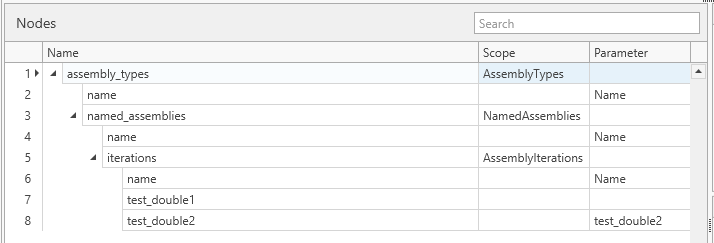
Each of the output formats has slightly different terms used for the elements in the structure, but the general concept is the same regardless of the output format. Nodes are created, and can have child nodes. Any contextual information is passed down to the child nodes. Nodes can be defined as being a scope change node. This means that the node cause the import to change the scope and
Data content
Once the scope has been defined, the tree that represents the structure of the imported file can be build. It's important that the nodes in the file have exactly the same name as the nodes in the tree. Then for each node the parameter defines in which parameter of the entity (represented by the scope) the value from the imported file is getting written to.
Running the ex-/import
see Data Export