Session Data
This view can be fully customized using a CGD and enabling the Use CGD for Session Data view option. If this option is enabled then the view may not match the examples shown in this page.
The session data is a view that can be used to store and edit all information for a specific session in an event/car. The session data view can be accessed from the event tab of the ribbon bar:

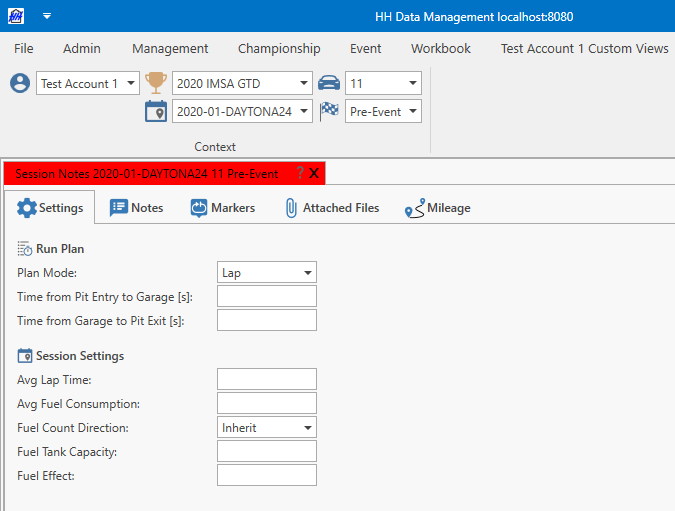
By default, there are five tabs on the session data view:
- Settings
- Notes
- Markers
- Attached files
- Mileage
Additional tabs can be added using a plugin
Settings
Run plan
The run plan mode for the session can be set here, and also some pit lane timing information for use in the lap mode of the run plan.
Session settings
The content under the session settings title can be customized using a plugin
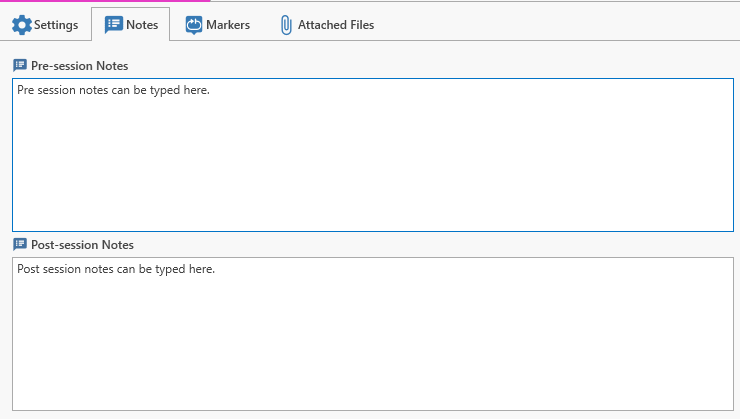
Notes
This tab provides two pre-defined textboxes to enter pre- and post-session notes.
Markers
The lap marker and lap track status marker associations can be defined on this tab.
Attached files
Shows an attached files view that allows files to be added.
Mileage
The manual and predictive mileage associations can be defined on this tab.
Best sectors and best lap times
Best lap time and best sector are calculated automatically on four different entities, and can be used anywhere math expressions are supported, such as custom views and CGDs:
- SessionCarData - the best lap time and sectors for one car, across all of its runs in the session.
- SessionCarDriver - the same, broken down per driver during the session. Accessed through
SessionCarData.SessionCar.SessionCarDrivers. - SessionData - the best lap time and sectors across every car in the session.
- SessionDriver - the best lap time and sectors for one driver across every car they drove in the session. Accessed through
SessionData.SessionDrivers.
Why some of these values can look incomplete
SessionCarData and SessionCarDriver only ever look at one car's own data, so they are always updated as soon as that car's data is loaded.
SessionData and SessionDriver, on the other hand, look across every car in the session. Depending on the open view and current context selection, the data for every car in the session may not be loaded when the view is first opened.
Because of this, SessionData and SessionDriver values can only be fully correct once every car's data has been loaded. If they are checked before that happens, they will only reflect the cars that are loaded at that moment - a value will still be shown, but it may not be the true best value.
The cache status page shows which caches are currently loaded, so it can be used to check whether all the cars in the session have been loaded before trusting a SessionData or SessionDriver value.
This also means that a car's data has to be subscribed to to be included - a car that isn't subscribed can't be loaded, so it will always be missing from SessionData and SessionDriver values
To see accurate SessionData or SessionDriver values across a whole session, use a custom view with the entity type SessionCarData All Cars. This entity type is specifically built to load every subscribed car in the session, so values that look across the whole session will always be complete.